Now Reading: 2D Arrays (Matrices) Explained: How to Store and Access Data
- 01
2D Arrays (Matrices) Explained: How to Store and Access Data
2D Arrays (Matrices) Explained: How to Store and Access Data


Written by Hamza Sanaulla
2D Arrays (Matrices) Explained: How to Store and Access Data. Imagine looking down at a classic chessboard, opening a spreadsheet full of quarterly expenses, or zooming in closely on a digital image until you see individual pixels. What do these seemingly unrelated things have in common? None of them exists in a single, straight line. They have height and width. They organize information across two axes simultaneously.
In computer programming fundamentals, we cannot efficiently force this kind of multi-axis information into a simple linear list without making our code messy, slow, and incredibly difficult to maintain. Instead, we use a specialized tool designed specifically for handling information arranged across a grid: the matrix data structure, commonly known as a two-dimensional array (or 2D array).
If you have ever felt intimidated by the concept of a multidimensional array, you are far from alone. Navigating multiple sets of brackets can feel like staring into a house of mirrors when you first encounter it. However, once you understand how a grid maps down to your computer’s hardware, the mystery vanishes. This comprehensive guide will pull back the curtain on how a matrix stores data, how memory layout dictates execution speeds, and how to write efficient code to manipulate these structural grids like a seasoned engineer.

What Is a 2D Array (Matrix)?
To understand a 2D grid, it helps to start on solid ground with things we already know. When you first learn about arrays in programming, you are introduced to a 1D array. Think of a standard 1D array as a single row of safety deposit boxes built into a wall. Each box has a single index number, starting at zero, allowing you to instantly store or retrieve an item.
A 2D array expands on this concept by adding a vertical axis. Instead of just one horizontal row of boxes, you now have a massive wall of boxes stacked neatly on top of each other. This creates a highly organized tabular data structure composed of intersecting horizontal rows and vertical columns.

When writing software, a 2D array syntax is essentially implemented as an array of arrays. This means that the outer container array does not hold raw values like integers or strings directly; instead, each element inside that master array is itself another separate array representing an individual row. Whether you are working with C arrays, configuring Java 2D arrays, or manipulating Python lists of lists, this “nested” architectural rule remains a universal constant across modern software design. Agar aap multi-language syntax ko details se dekhna chahte hain, toh aap GeeksforGeeks Matrix Tutorial par iski detailed implementation dekh sakte hain.
Difference Between 1D and 2D Arrays
The dividing line between a 1D array and a 2D array comes down to structural dimensions and coordinate requirements:
- Dimensionality and Mapping: A 1D array maps data along a single linear path. It is ideal for basic, sequential lists such as high-score trackers, shopping items, or a list of user IDs. A 2D array handles data that naturally possesses spatial or structural relationships across two variables, such as coordinate grids or mathematical matrices.
- Lookup Coordinates: To find an item in a 1D array, you only need to supply a single address index. Finding an item in a 2D array requires a coordinate pair consisting of a row identifier and a column identifier. Omitting one of these coordinates leaves you pointing at an entire sequence rather than a single value.
Real-World Examples of 2D Arrays
We interact with matrices constantly without labeling them as data structures. Your Google Sheets or Microsoft Excel workbooks are classic representations of matrices where rows (numbered) and columns (lettered) isolate financial entries.
Digital photography relies entirely on this concept. Every digital image file is an itemized grid of color values. If you inspect a grayscale photograph, it is processed under the hood as a single 2D array where each array element holds a brightness number ranging from 0 (pure black) to 255 (pure white).
Similarly, game developers rely on these grids to build level maps for titles like Civilization or retro arcade games. The game map is tracked behind the scenes as a matrix where a 0 indicates walkable open grass, a 1 represents an impassable stone wall, and a 2 denotes an interactive treasure chest.
How Data Is Stored in a 2D Array
The fundamental rule of physical hardware layout is simple: computer memory is strictly linear. Your computer’s random-access memory (RAM) is not a grid; it does not have physical rows or columns. Instead, RAM is an extraordinarily long, single-file line of sequential memory addresses.
This creates an interesting engineering puzzle: how does a computer manage storing data in a matrix when the underlying hardware can only read and write in a straight line?
To solve this, compilers and interpreters use mathematical translation formulas to flatten our logical 2D grids into a linear 1D sequence during array memory allocation.
Rows and Columns Explained
When a program allocates space for a matrix, it reserves a contiguous block of memory large enough to hold every cell in the grid. If you declare a grid with $M$ rows and $N$ columns, the computer must clear out a single linear block capable of holding exactly $M \times N$ elements.
The software maps out the coordinates by assigning boundaries based on the total number of columns per row. This ensures that even though the elements sit sequentially in hardware, the runtime engine can instantly calculate exactly where any given row ends and the next one begins.
Memory Representation of a Matrix
To flatten a grid into a continuous line of memory addresses, programming languages use one of two primary structural philosophies:
- Row-Major Order: The system saves the matrix row by row. It writes the entire contents of Row 0 sequentially into memory, places the entire contents of Row 1 immediately after it, followed by Row 2, and so on. This approach is the standard convention for languages like C, C++, and Java.
- Column-Major Order: The system saves the matrix column by column. It stores the entire first column in memory, followed by the entire second column, and continues down the line. Languages like Fortran, MATLAB, and certain data-science libraries lean heavily on this architecture.
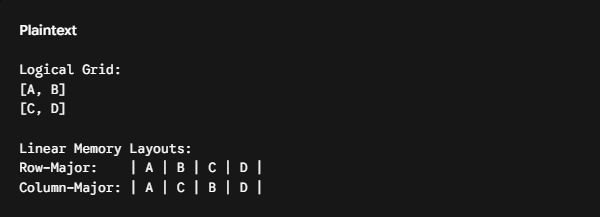
Understanding this layout choice is critical for memory management and performance. Modern computer CPUs utilize an optimization strategy known as caching. When a program requests a single piece of data from RAM, the CPU does not just fetch that isolated value; it automatically pulls a whole chunk of neighboring data into an ultra-fast local memory pool called a cache line.
If you are writing code in a row-major language like C, reading elements row by row means you are scanning memory sequentially. The CPU cache will pre-fetch your upcoming data, causing your program to execute incredibly fast.
However, if you attempt to traverse that same C matrix column by column, your code will constantly hop across distant memory addresses. This triggers a performance bottleneck known as a cache miss, forcing the CPU to repeatedly halt execution to pull new chunks from the main system RAM.

How to Access Elements in a 2D Array
Because data is stored contiguously, the computer does not need to scan through your entire matrix to find a specific cell. Instead, it uses indexing concepts to perform a lightning-fast mathematical lookup that takes $O(1)$ constant time, regardless of whether your grid contains nine elements or nine million.
If you are serious about mastering these concepts to pass technical interviews or advance your career, dedicating time to structured data structures training or a comprehensive matrix programming tutorial will pay massive dividends. Is silsile me basic data organization aur processing theory ko mazeed behtar samajhne ke liye aap Khan Academy Computer Science Theory ka vizit kar sakte hain.
Using Row and Column Indexes
To pull an individual value out of a matrix, you must supply two distinct coordinates inside square brackets: the row index followed immediately by the column index.
Critical Indexing Rule: Almost all modern computer programming languages utilize zero-based indexing. Your very first row is identified as Row 0, and your very first column is identified as Column 0.
If a matrix has 5 rows, the valid row index range runs from 0 to 4. Attempting to request index 5 will crash your program with a dreaded “index out of bounds” error.
Accessing Specific Matrix Values
Let’s see this coordinate system in action using concrete matrix coding examples. Suppose we have initialized a 2D array containing numbers representing a small data grid:
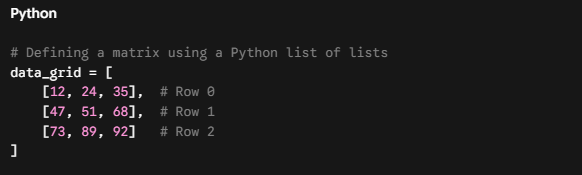
Let’s say we want to access the value 68 from this grid. How do we pinpoint its unique array element position?
- First, look along the horizontal axis to find the row. The number 68 is located in the middle row, which corresponds to Row 1.
- Next, look along the vertical axis to find the column. The number 68 sits in the rightmost column, which corresponds to Column 2.
By combining these two coordinates, we can accurately target and print the element:

Under the hood, the compiler evaluates data_grid[1][2] using an internal memory calculation formula:
Address = Base Address + (Row Index \times \ Total Columns) + Column Index
This basic formula allows the computer to skip straight to the exact location of your target element instantly, entirely eliminating any guesswork or scanning overhead.

Common Operations on 2D Arrays
Once you are comfortable locating single elements, you can begin exploring matrix manipulation and data processing. These operations form the core foundation of algorithm design and are highly valued competencies in any professional data structures certification curriculum.
Traversing a Matrix
The most frequent operation you will run on a grid is a full matrix traversal, which means visiting every single cell systematically to inspect, print, or calculate values. Because a 2D array expands across two independent axes, a single loop is insufficient. We must implement nested loops, a loop running inside another loop.
The outer loop handles vertical movement down the rows, while the inner loop handles horizontal movement across the columns within the active row. Here is how a standard row-by-row matrix traversal looks in code:
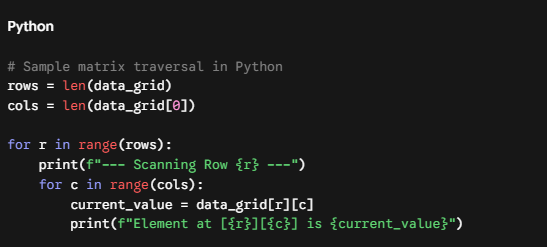
When this code executes, the outer variable r locks firmly at 0. The inner loop then takes over, incrementing c from 0 to 2 to read every cell in the first row. Once the inner loop hits its limit, control returns to the outer loop. The row pointer r increments to 1, and the inner loop resets to cleanly scan the next row from left to right.
Updating and Modifying Elements
Modifying a matrix uses the same coordinate system as reading from one. Instead of just viewing a value, you use an assignment operator to overwrite the data sitting at those specific coordinates.

You can also combine traversal loops with modification statements to perform batch edits across your entire dataset. For instance, if you need to reset all negative numbers to zero in an image pixel array, or multiply an entire financial grid by a tax rate, running a nested loop makes these adjustments incredibly straightforward.
Advantages and Uses of 2D Arrays
Like any data structure, 2D arrays have specific trade-offs. They are highly specialized tools that excel in certain environments but can cause performance bottlenecks if applied incorrectly to the wrong type of problem.
Key Advantages
- Predictable, Fixed-Time Lookups: Because memory allocation is completely contiguous, accessing any random cell takes the same, predictable time ($O(1)$), whether the element is at the start or the end of the grid.
- Structural Alignment: Grids mirror real-world multi-variable tracking setups perfectly. It is highly intuitive to represent tables, matrices, and spatial coordinates inside a 2D array because the code architecture matches the physical layout of the data.
Structural Disadvantages
- Inflexible Sizing: In many lower-level programming languages, a 2D array’s size is fixed at creation. If you declare a $100 \times 100$ grid, you cannot easily grow it to $105 \times 100$ later without allocating a completely new matrix and copying all the data over.
- Memory Waste (Sparse Matrices): If you create a massive $1000 \times 1000$ matrix but only store data in ten of those cells, the computer still reserves and holds memory space for all one million cells. This issue can lead to massive resource waste.
Applications in Games, Spreadsheets, and Data Processing
Despite these trade-offs, practical uses of matrices are foundational to modern technology:
| Industry / Domain | Common Matrix Application |
| Game Development | Tracking map layouts, tile properties, coordinate collisions, and pathfinding routes for AI characters. |
| Data Analytics | Processing pivot tables, storing financial multi-quarter reports, and structuring relational database outputs. |
| Computer Vision | Storing raw image pixels, parsing color channels, and applying convolution filters to photos or video streams. |
| Artificial Intelligence | Executing high-speed linear algebra computations, weight updates, and matrix transformations for deep neural networks. |

Quick Summary / Key Takeaways
Before concluding, let’s review the core concepts covered in this guide:
- Grid Framework: A 2D array is an organized tabular data structure made of intersecting rows and columns. It functions essentially as a nested array of arrays.
- Linear Hardware Layout: Physical computer memory is completely linear. Matrices are flattened into continuous memory blocks using either row-major order or column-major order.
- Zero-Based Coordinates: Finding an array element’s position requires an explicit
[row][column]coordinate pair. These pointers use zero-based indexing, meaning the top-left item is always found at index[0][0]. - Nested Loop Traversal: Iterating through a complete matrix requires using nested loops, where an outer loop controls row selection and an inner loop controls column traversal.

Conclusion
Mastering the mechanics of 2D arrays is an essential milestone that transitions you from basic syntax tracking to advanced, structural software engineering. Once you understand how these structures operate, you unlock the ability to tackle complex graphics programming, data analytics pipelines, and game engines.
The absolute best way to cement these concepts is through hands-on practice. If you are ready to take your programming skills to the next level, search out interactive array practice exercises or enroll in a structured 2D arrays programming course online. Writing your own nested loops and watching variables update in a live terminal remains the single most effective way to turn theory into true engineering mastery.
FAQs
What is a 2D array?
A 2D array is a data structure that stores values in rows and columns, similar to a table or matrix.
How do you access data in a 2D array?
You access data using two indexes: one for the row and one for the column, such as array[row][column].
What is the difference between an array and a matrix?
An array can be one-dimensional or multi-dimensional, while a matrix specifically refers to a two-dimensional arrangement of data.
Why are 2D arrays used in programming?
2D arrays are used to organize and manage tabular data, grids, game boards, and matrix-based calculations efficiently.
How are matrices stored in memory?
Matrices are stored as a continuous block of memory, typically in row-major or column-major order depending on the programming language.
What are rows and columns in a 2D array?
Rows run horizontally, and columns run vertically, helping organize data into a structured grid.
Can a 2D array have different row sizes?
In some languages, jagged arrays allow different row sizes, while standard 2D arrays usually require all rows to have the same length.
How do you traverse a matrix efficiently?
A matrix is commonly traversed using nested loops, where the outer loop iterates through rows and the inner loop processes columns.
Related Blogs
What is DSA? Why Every Programmer Must Learn Data Structures and Algorithms
Time Complexity and Big O Notation Explained Like You’re 10 Years Old
Arrays in Data Structures: Complete Guide with Real-Life Examples
Array vs Linked List: Which One Should You Use and When?